Average Typing Speed (WPM) by Age: Global Benchmarks & Analysis
Keyboarding efficiency remains a core practical competency across global education, corporate operations, and digital communication. Understanding how Words Per Minute (WPM) metrics scale across demographic age brackets provides essential context for educators, hiring managers, and individuals striving for career advancement.
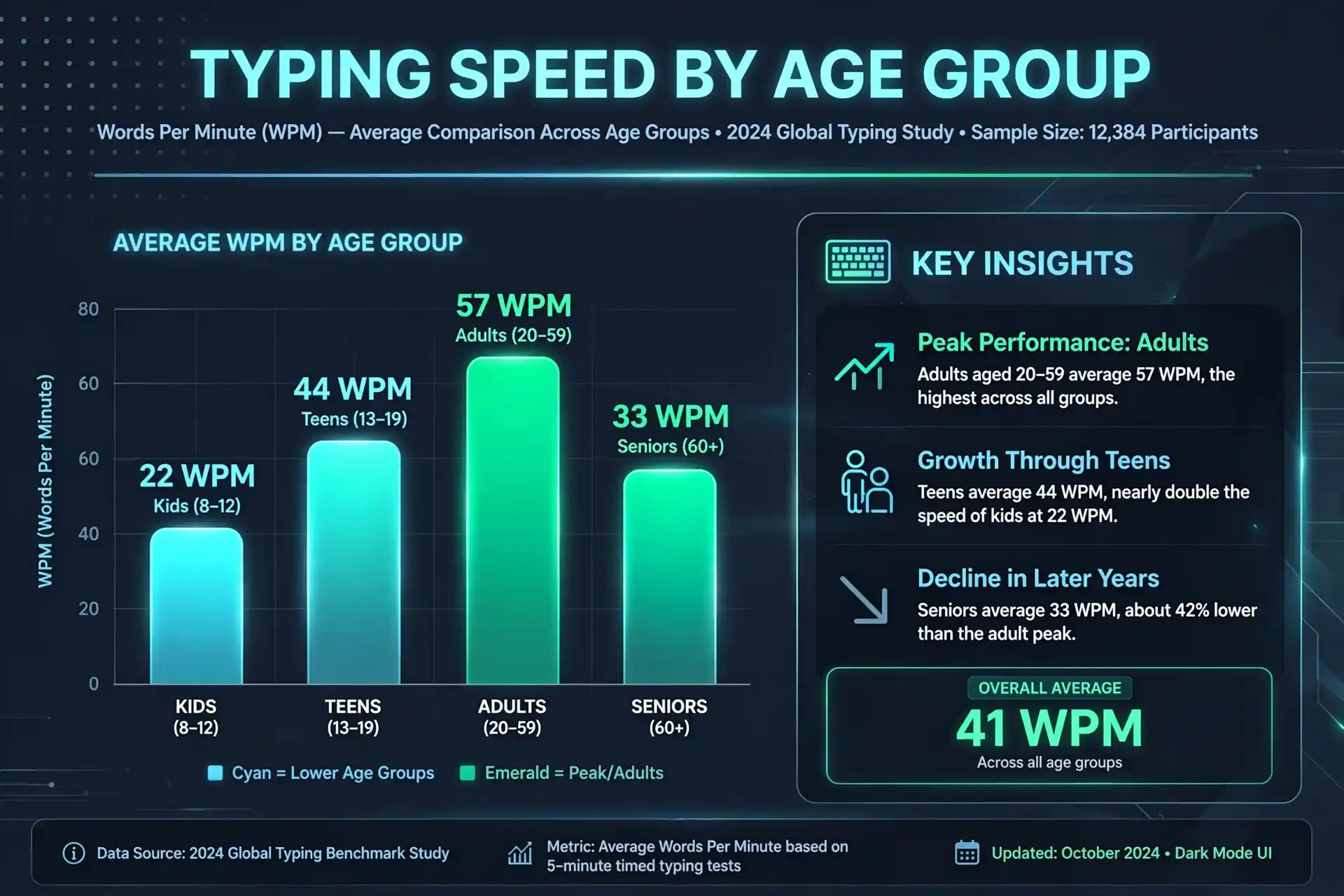
What is the Average WPM Across All Age Demographics?
Across millions of standardized online typing evaluations recorded worldwide, the unassisted global average typing speed is approximately 40 Words Per Minute (WPM) with an unadjusted accuracy rate of 92%. A standard word in keying metrics is defined as exactly five keystrokes, including spaces and punctuation marks. Therefore, a typist achieving 40 WPM processes roughly 200 keypresses per minute or 3.33 characters every second.
However, establishing a flat 40 WPM benchmark obscures significant performance variances driven by physical finger dexterity, cognitive processing speed, daily keyboard exposure, and formal touch-typing instruction. For instance, self-taught "hunt-and-peck" typists utilize an average of 2 to 4 fingers and plateau near 28 to 34 WPM. In contrast, individuals who master 10-finger blind touch-typing routinely average 65 to 85 WPM with error rates under 2%.
To evaluate where your current physical mechanics place you on the bell curve, take our free 1-minute typing test or benchmark endurance over our 5-minute typing test to receive a detailed breakdown of gross speed vs net accuracy.
Comprehensive WPM Breakdown by Age Group
The table below aggregates empirical data from educational institutions, occupational assessments, and digital research cohorts to outline expected typing benchmarks across developmental age brackets.
| Age Group | Developmental Phase | Average WPM | Top 10% WPM | Accuracy Target |
|---|---|---|---|---|
| Elementary (Ages 6–11) | Early motor skill & key mapping | 10 – 20 WPM | 30+ WPM | 80% – 88% |
| Middle & High School (12–17) | Rapid digital messaging & coursework | 30 – 45 WPM | 60+ WPM | 90% – 94% |
| Young Professionals (18–39) | Peak neuromuscular reaction & career usage | 45 – 65 WPM | 85+ WPM | 95% – 98% |
| Older Adults (Ages 40–59) | High steady consistency & error control | 35 – 50 WPM | 70+ WPM | 94% – 97% |
| Seniors (Ages 60+) | Deliberate keying with predictive glance | 25 – 40 WPM | 55+ WPM | 92% – 96% |
Key Factors Influencing Typing Speed As We Age
1. Cognitive Processing Speed & Neuromuscular Coordination
Typing is an intricate cognitive-motor task. It requires rapid visual recognition of text tokens, translation into brain motor signals, and coordinated execution by intrinsic hand muscles. In children under 12, fine motor neural pathways are still maturing, limiting rapid mechanical repetition. Peak physical reflex velocity occurs between ages 18 and 26, explaining why competitive speed typists and gamers dominate this demographic. Beyond age 50, raw motor reaction slows slightly by 2 to 5 milliseconds per decade, but experienced typists compensate by extending their predictive eye-span—reading 3 to 4 words ahead of their active fingers.
2. Mechanical Keyboards vs. Laptop Chiclet Keys
Hardware tactile response heavily influences speed and fatigue over extended typing sessions. Younger demographics frequently perform typing tasks on low-travel laptop chiclet keyboards or mobile touchscreens, which offer minimal tactile registration bumps. In contrast, professionals utilizing tactile mechanical switches (such as Cherry MX Browns or linear Lubed switches) benefit from clear physical actuation feedback prior to bottoming out keycaps, reducing finger impact shock and boosting confidence during high-velocity keying.
3. Early Exposure & Digital Literacy vs. Touch-Typing Training
While younger generations possess high digital familiarity due to early smartphone and tablet adoption, smartphone usage does not translate to desktop QWERTY keyboard fluency. In fact, studies show students who receive formal structured touch-typing education in middle school outperform self-taught college students who rely on erratic visual searching.
WPM Benchmarks for Modern Employment
In professional hiring environments, typing speed is frequently evaluated to ensure workforce productivity. Modern jobs demand distinct WPM thresholds depending on the volume of structured data entry or creative composition required:
General Administrative & Support
Requirement: 45 – 55 WPM (95% Accuracy)
Covers administrative assistants, customer service representatives, and office coordinators managing email correspondence and routine document filing.
Data Entry & Numeric Accounting
Requirement: 60 – 75 WPM + 10-Key Mastery
Requires intense alphanumeric precision. Candidates are frequently tested using our 10-key numeric keypad test to measure Keystrokes Per Hour (KPH).
Software Engineering & DevOps
Requirement: 50 – 70 WPM + Symbol Precision
While code logic takes priority over raw typing speed, rapid typing enables smooth thought translation, shell navigation, and IDE shortcut execution without breaking focus.
Legal, Medical & Court Transcription
Requirement: 80 – 120+ WPM (99% Accuracy)
Demands specialized medical or legal terminology fluency alongside near-zero error tolerances. Verified documentation can be generated using our official typing certificate tool.
How to Outperform Your Age Demographic Baseline
If your current speed falls below your age bracket's 75th percentile, you can systematically build muscle memory using a 4-step daily training protocol:
- Master the Home-Row Anchor: Always rest index fingers on the
FandJhome keys (utilizing tactile bumps). Return all fingers to home row after reaching upper or lower letter rows. - Eliminate Visual Glance Dependencies: Cover your keyboard with a towel or keep your eyes locked strictly on the screen text to force brain motor neural mapping.
- Practice 15-Minute Daily Micro-Sessions: Short, consistent daily sessions stimulate neuromuscular synaptic strengthening far more effectively than exhausting 2-hour weekend sessions.
- Leverage Multilingual Tools for Global Typing: International workers can practice regional keyboard layouts using our specialized tools like Spanish Typing Test or French Typing Test.
Frequently Asked Questions
Benchmark Your Typing Speed Today
Take a free 1-minute test, measure your net accuracy, and claim your official PDF certificate.